HTML Sites for Beginners

I was asked to show one of our new programmers around how to build a website and they didn’t have any experience in the area yet, so I did a little digging to find some beginners guides to HTML:
  • Read HTML Beginner/Intermediate, CSS Beginer/Intermediate
  • The advanced HTML isn’t really needed for us (though it can’t hurt)
  • Advanced CSS, Display & Page Layout are important to know
  • Read the current top voted answer ‘Learn Simple Things First’
  • Another good site with various tutorials across a wide range of topics
  • Great tutorials though a little outdated when it comes to current best practices

Visual Studio Find and Replace with Regular Expressions

One of the latest neat little features I’ve started using is Visual Studio’s Find & Replace function but using regular expressions for the search terms, for example:

Find what:
\.Item\("{(:a|_|-)*}"\)
Replace With:
!\1
Converts
.Item("cState")
Into:
!cState

If we were to break down what each regex is doing we would have the following:

In our first expression we have \.Item\("{(:a|_|-)*}"\)
  • The :a is a VS shortcut for [a-zA-Z0-9]
  • (:a|_|-) groups it with the underscore and dash giving us the effect of ([a-zA-Z0-9]|_|-)
  • * matches 0 or more of the previous expression

Now the special chars:

  • the {} tags the expression so we can use it as a variable in our replace box.
  • the replace box just has !\1, where \1 refers to the first tagged expression in our find box, if we had multiple {} in the find string, we could address them accordingly with \2, \3 and so on.
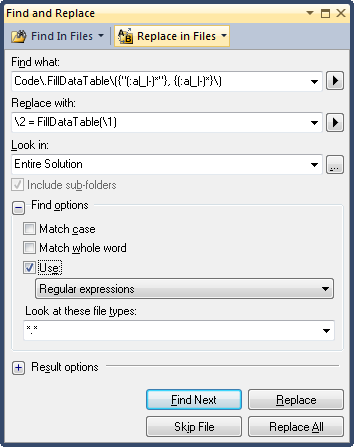
Here’s a second example using multiple tagged expressions. Another time I was refactoring a sub routine into a function.  Previously the sub was taking in a datatable by reference and modifying it locally, but now it was returning the datatable.  So every where the method was being called needed to be altered in pretty much the same way.  The following terms made the rest of my refactoring chore much easier:
Find What:
Code\.FillDataTable\({"(:a|_|-)*"}, {(:a|_|-)*}\)
Replace With:
\2 = FillDataTable(\1)
findreplace
Takes code of the format:
Code.FillDataTable("usp_FillStates", dtStates)
and changes it to:
dtStates = FillDataTable("usp_FillStates")
Thanks to the find/replace feature this saved me a bunch of time!
My Essential Programs

I’ve decided to post up a list of my essential applications.  These are a collection of little utilities that make my computing experience much more enjoyable.
Windows Tools:
StrokeIT – Mouse Gesture Application
AutoHotkey – Keyboard Automation & Global Hotkey Management
Launchy – Free, cross platform utility for launching programs, documents, project files, and bookmarks from the keyboard.
7zip – free WinZip replacement
PDFCreator – “Print” to PDF Files  (not recommended due to spyware)
BullZip PDF Printer – “Print” to PDF Files
BeyondCompare – File Comparison Tool
grepWin – search/replace text files
Renamer – Batch File Renamer written by Albert Bertilsson
System/Process Debugging Tools:
ProcessExplorer – Detailed Running Process Information
ProcessMonitor – Detailed System Event Viewer
TCPView – Views Open TCP Connections
FileMon – Monitors File System
Wireshark – Network Monitoring Tool (Sniffer)
WinSpy++ – Find Window Handles
Reflector – .NET Disassembler
SoapTrace – Capture SOAP Transactions
Shexview – Shell Extension Viewer
Misc Tools:
TortoiseSVN/Subversion – Source Control Client/Server
DropBox – Distributed File Synchronization Tool
PuTTY – Remote Access (SSH)
KeePass – Password Management Tool
WinSCP – Secure File Copy
“Fun” Tools:
Flickr Uploadr – Picture uploading tool
Electric Sheep – Screen Saver
Online Tools:
Lovely Charts: Free online flow chart/diagram making